

PlayStation App
The PlayStation App for Android is built around staying connected with PlayStation friends, including online status, messaging, game invites and notifications. It also lets users track trophies, edit profile and account settings, and start game downloads on a compatible PS5 or PS4 console.
Screenshots
About this app
The PlayStation App is an Android application listed in the Social category, with version 25.10.0 shown in its listing. Its central purpose is helping PlayStation players stay connected with their friends: seeing who is online, sending messages, handling game invitations, and following what friends are doing in their games. Trophy tracking, profile and account settings, and PlayStation Store access support that social core rather than replacing the console.
Keeping track of your friends list
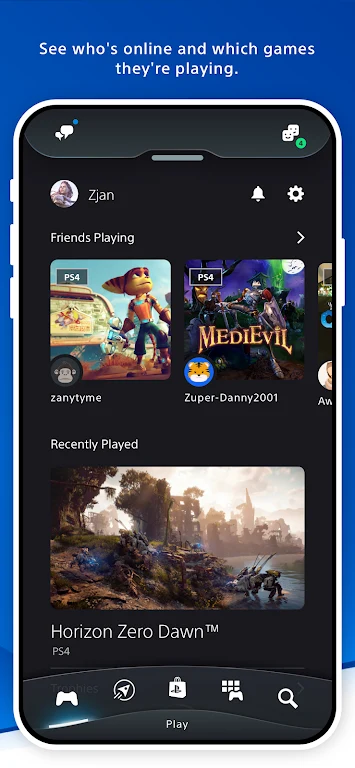
According to the listing, the friends list shows which contacts are online and what they are doing while you are away from your console. You can also search for other players and send friend requests from the phone. The listing presents this as a practical convenience: if you meet someone in person, you do not have to wait until you are home to add their PSN account.
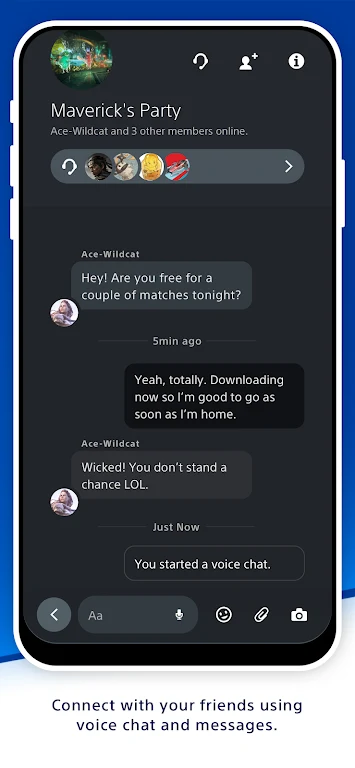
The highlights section adds that the app supports real-time chat with friends through voice or text messages. A user review in the listing describes messaging through the app as easier than typing with a controller during play, and says that invitations appear on the phone rather than repeatedly on the console screen in the middle of a game. These are individual user comments and have not been independently verified.
Notifications and game invitations
The features section states that notifications which would normally be sent to your PlayStation are also alerted on your Android device. The highlights section describes the same area in broader terms, saying users can receive real-time updates on friend activity, game invitations, and new deals or releases. Taken together, these points show that the app is meant to act as a second place to see PlayStation activity when you are not using the console.
Profile and account settings
The listing says you can customize your profile from your Android device. Documented options include changing your avatar and profile picture, as well as your real name. The features section also says you can edit personal, online, and gaming settings through the app. The FAQ section additionally states that the app supports two-factor authentication for added account security. The listing does not describe the specific steps for each setting, so this profile does not go beyond those documented options.
Trophies, achievements and game progress
The app is also described as a way to view the progress of your games and your trophy list and completion status. The listing says this helps you see what remains to be done before you return home, manage your goals and progression, and show achievements to other people. The highlights section adds that you can browse your personal game collection, see recent activity, and track progress. Trophy and progress information is therefore presented as a view for personal tracking and sharing, not as a separate gaming feature.
Game library, PlayStation Store and remote downloads
The listing describes the PlayStation Store as accessible from the app, where users can download games, add-ons, DLC, and other content. The highlights section says you can browse, buy, and pre-order games from the phone, and then send them to your console. The same section describes remote console control, which allows you to start downloads or updates on a PS5 or PS4 so that games are ready when you get home. The FAQ also confirms that purchases of games and add-ons can be made through the PlayStation Store integrated into the app.
Requirements and limitations
The listing is clear that the app is not a way to play PlayStation games on a phone. It states that phone screens are not advanced enough for PS5 or PS4 gameplay, and the FAQ says the app does not allow games to be played directly on the phone. Some FAQ wording refers to remote play when connected to a compatible device, but this conflicts with the statement that phone gameplay is not supported, so this profile describes only the remote download and control functions the listing documents.
The FAQ says the app is free to download from the Apple App Store and Google Play Store. It also states that no subscription is needed for the basic features, while a PS Plus subscription may be needed for some premium services. The listing does not specify which premium services require it, and it does not list every compatible console or device requirement, so those details should be checked on the official store listing before installing.
What user reviews mention
The listing includes several user reviews that reflect different experiences. One reviewer praises the design, ease of use, and messaging, and describes the capture gallery as useful for saving clips to the phone camera roll or sending them as messages. The same reviewer reports that clips sometimes take days to become ready in the app, and that clips from older games can be hard to find. Another reviewer prefers the earlier layout, saying the friends, followers, and what's new views were more useful, and that customizing profiles and group chats was easier before. A further review asks for more control over which friends can see a user's friends list. These comments are useful as examples of user feedback, but they are not independent tests and do not represent every user's experience.
Version history
View all30 Apr 2026 · stable
APK25.10.028 Oct 2025 · stable
Frequently asked questions
What category is the PlayStation App listed under?
The PlayStation App is listed under the Social category in the supplied source data.
Which version of the PlayStation App does this profile describe?
The source data identifies version 25.10.0 as the version name for this listing.