

Plural
Plural.comPlural is a networking and work-management app for freelancers, independent service providers, and small teams. It centers on searchable, skills-focused profiles, map-based local discovery, and predefined hiring types that structure common engagements.
Screenshots


About this app
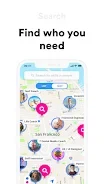
Plural is a networking and work-management app for freelancers, independent service providers, and small teams that want clients to find them and manage hiring with fewer manual steps. Its core function, as described in the supplied information, is a searchable, skills-focused profile that appears on a local map, so people looking for help can discover nearby professionals. The app then supports the hiring process through predefined engagement types, messaging, scheduling, and referrals.
Building a profile clients can search
A Plural profile can display expertise, location, rates, and recent work samples, and you choose which of these details are visible to searchers and contacts. Profiles are built in steps, so you can start with basic information and add portfolio pieces, service descriptions, and availability later. Customization options let you decide which services appear first, select cover images for portfolio items, and present tiered pricing or packages for different client needs.
Map-based discovery and search
Clients can browse a map to locate professionals nearby. A built-in search filters results by skills, availability, and verification status. The map views are described as prioritizing proximity and skill relevance. The discovery flow is organized around matching, and clients can also request referrals from mutual contacts directly through the app.
Predefined hiring types and day-to-day tools
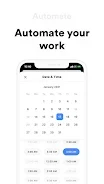
Plural includes predefined engagement types, such as short consultations, hourly work, and fixed-price tasks. According to the description, these types set clearer expectations for scope, timeframes, and payment terms, which can reduce repeated negotiation. Once a hiring flow begins, messaging is threaded around each engagement, and a lightweight calendar lets you propose and confirm times alongside open availability. The app also offers basic payment options for deposits and final transactions.
Verification, referrals, and reputation
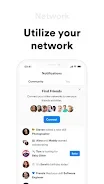
User verification and an opt-in referral system are presented as trust signals that help clients evaluate candidates. Rather than a single numerical score, reputation is shown through profile elements such as the number of verified referrals, a gallery of recent work, and an availability history. The app also keeps simple records of past work and referrals, which you can use to show relevant examples when responding to requests.
Notifications, controls, and offline viewing
Notifications can be adjusted for referrals, messages, and booking confirmations. Basic controls include tapping to view a profile, tapping or swiping to filter search results, and long-pressing optional items for actions such as saving or sharing a profile. The app includes basic accessibility support for larger text and screen-reader labels on core buttons. Cached profile data and recent messages remain viewable without a connection, while outbound actions such as sending messages or payments are queued until a network is available.
Limitations to consider
The description states that results depend on the activity and completeness of your local network, and that profiles with more referrals and current portfolios tend to perform better. Referral-based trust can be slower when contacts take time to respond. Some specialized or complex workflows may still require coordination outside the app, and the predefined hiring types may not cover every bespoke contract.
Version history
View all15 Oct 2026 · stable
Frequently asked questions
Does Plural keep data consistent between a phone and a desktop?
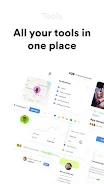
The description says that syncing across devices keeps your profile, conversations, and scheduled items consistent on phone and desktop. It also states that the desktop layout adapts the same elements to a broader workspace, with messaging and calendar side by side.
What minimum Android version does Plural require?
The supplied information does not provide a clear minimum Android version, so check the app's store listing for compatibility details before installing.