

SOLUM Smart Light
SoluMSOLUM Smart Light centralizes control of compatible bulbs and fixtures, with remote switching, brightness adjustment, color management, schedules, scenes, and automation. It supports single-room and multi-zone setups through local Wi-Fi or Bluetooth connections, with cloud access where available.
Screenshots
About this app
SOLUM Smart Light is a mobile app for managing compatible smart bulbs and fixtures from a central control panel. It combines everyday controls such as switching lights and adjusting brightness with scheduling, scenes, color settings, and automation for single-room or multi-zone installations.
Connected lighting control
The app links compatible devices and gateways through local Wi-Fi or Bluetooth, then synchronizes device status with the app. Remote control can be used to turn lights on or off and change brightness over the local network or through cloud access. After pairing, the available controls reflect the capabilities of each device, such as dimming, color adjustment, or scene support.
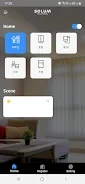
A tile-based home screen provides shortcuts for frequent actions. Users can switch between a compact grid for quick toggles and an expanded view for more precise adjustments. Familiar icons, readable text, and optional haptic or audio feedback are included to help confirm actions.
Schedules, scenes, and routines
Schedules can use recurring events, sunrise and sunset triggers, or one-time actions. Scenes save configurations for multiple lights so a room or group can be changed together. Lights can also be grouped for synchronized behavior, while accent fixtures can remain under independent control.
Routines combine time triggers with geofencing and sensor input where those functions are supported by the connected setup. A routine may adjust brightness and color temperature at a chosen time, while conditional actions can produce different results according to the time of day or sensor information. Voice assistant integrations are available for hands-free operation.
Color and transition customization
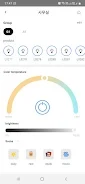
Color pickers support precise shade selection and curated palettes for activities such as reading, cooking, or relaxation. Users can create scenes with layered transitions and duration controls. Gradients and fades provide smoother changes between scenes instead of abrupt switching, while color temperature controls can be used for mood or task-oriented lighting.
Energy information and setup
Energy reports show usage trends and can help identify schedules associated with higher consumption. The guided setup starts with account creation, followed by a pairing wizard for adding devices and assigning them to rooms. An introductory tutorial demonstrates scene creation and scheduling.
For larger installations, clearly labeling devices during setup can make routine editing easier. The supplied troubleshooting guidance recommends keeping bulb and bridge firmware current, placing hubs centrally to improve responsiveness, and rebooting a gateway when a device stops responding before removing its pairing.
Version history
View all15 Oct 2026 · stable